
CS2 ESP and Aimbot Features
FACEIT build aimbot options vary by release. Check whether your listing includes smooth aim, FOV, bone selection and visible checks.
Product Overview


At a glance
Key capabilities
CS2 player ESP on the FACEIT build is designed to show boxes, skeletons, health and radar options. Check the full module list for aim and stream proof controls.
Overview
Counter Strike 2 Cheats | FACEIT build modules
How modules, presets, and patch day status checks fit ROB RUN survival workflows.
Check which modules your FACEIT listing includes before changing overlay layout. Start with player ESP, radar and aim settings that match how you want rounds to look.
Send support your Windows version and Steam build if HVCI, Core Isolation or Cloud DMA requirements are unclear.
This listing is the FACEIT Version built for FACEIT anti cheat lobbies, not the standard Valve matchmaking client. Player ESP readouts can show boxes, skeletons, health and radar options where the current build lists them.
Menu, delivery and support
The menu groups Visuals, Aimbot and Misc so you can tune overlays and aim response before a session. The loader and steps arrive through the buyer account after purchase. The partner listing notes that Cloud DMA is required for full functionality on supported builds. Ask support what your checkout includes.
FACEIT Version scope
The partner product is the FACEIT Version for FACEIT anti cheat lobbies. It is not the standard CS2 public or Premier matchmaking client. Confirm the lobby type you play before ordering.
Aimbot controls
Listed aim options include smooth aim, FOV control, bone selection and a visible check. Activation keys are configurable in the menu. Aggressive settings are easier for other players to notice.
Player ESP and wallhack readouts
Visuals cover player ESP with box style, skeleton lines and health labels where the build lists them. Colors and layout options are designed to keep busy bombsite fights readable.
Radar and stream proof overlay
Radar toggles and bomb related readouts appear when the current build includes them. Stream proof mode is designed to hide overlay elements from common capture setups when enabled.
Misc, configs and Cloud DMA
Misc includes config save and load, hotkeys and panic keys on supported releases. The listing states that Cloud DMA is required for full functionality. That is a separate purchase with its own checkout page.
Compatibility and requirements
The partner listing supports Windows 10 and 11 with HVCI on, Core Isolation on, TPM on and Secure Boot on. Confirm your firmware and Windows Security settings with support before ordering.
Updates and status
CS2 patches and FACEIT anti cheat updates can change menu options overnight. Check status notes and ask support after major updates. Third party tools can be detected and can stop working when enforcement changes.
Modules
What's included
Read this list against the version you plan to use. Optional modules can differ between releases.
- FACEIT Version for FACEIT anti cheat lobbies
- Smooth aim, FOV control and bone selection
- Visible check on supported builds
- Player ESP with box, skeleton and health options
- In game radar options where listed
- Stream proof overlay toggle
- Config save and load with hotkeys
- Cloud DMA required for full functionality per listing
- Monthly and lifetime plans on the partner page
Experience
Menu layers, after checkout
Look at the Visuals, World and Aimbot tabs before setting up the loader. The portal steps cover what follows checkout.
In game layers
- Layer A
In game ESP overlay
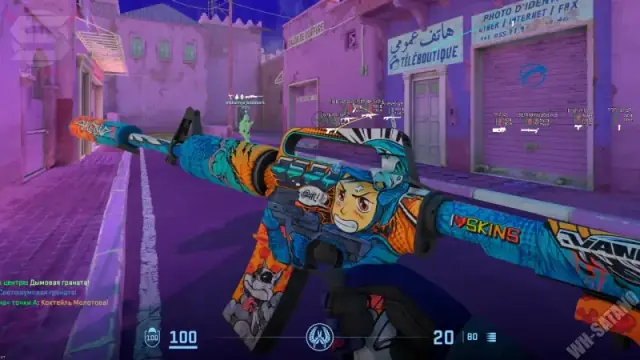
Gameplay on Dust II with boxes, player tags and weapon labels drawn through cover before you commit to a peek.
- Layer B
Visuals menu
The Visuals tab groups player ESP, box style, skeleton, health and radar options with per control toggles.
- Layer C
Aimbot menu
Smooth aim, aim keys, FOV and bone selection sit in the Aimbot card, with a visible check toggle on supported builds.
- Layer D
Misc and config
Misc covers menu keys, stream proof mode, saved configs and hotkeys. Cloud DMA status appears where the build lists it.
More products
Pairs well with
Check requirements and checkout for each listing.
FAQ
Questions about this page
Answers tied to what you are reading. Visit the FAQ page for every topic.
Blog
Related guides
Filter by topic to find setup guides, feature deep dives, and patch day notes.

A practical checklist for choosing Counter Strike 2 cheats, covering features that matter in round based play, status labels, support and the risks worth knowing about.

A short explanation of how third party CS2 platforms differ from Valve matchmaking and what that means for cheat users.
A plain explanation of ESP and wallhack tools in Counter Strike 2 and how to configure them so they stay useful.
Learn what the common CS2 aimbot options do and why subtle setups tend to draw less attention.
A calm walkthrough of the general setup flow for a first time CS2 cheat user.
A practical way to choose between monthly and lifetime access for a CS2 cheat.
Counter Strike 2 Cheats forum
Read discussion
Community archive of published CS2 cheat threads on loaders, ESP layouts, patch status, and HWID blocks. Browse past posts; new replies are not accepted on cheatsforcs2.net.
- CS2 General Discussion What should you actually check when comparing Counter Strike 2 cheats? A player asks what details are worth comparing when looking at different CS2 products, beyond a flashy feature list.
- CS2 Feature Discussion ESP and radar are listed together a lot, but are they meant to show the same information? A player asks whether ESP and radar are interchangeable terms or separate feature descriptions.
- CS2 News and Status CS2 updates and third party tool status, where should announcements be posted? Members discuss the best place to find dated product notices after a CS2 update and what a responsible announcement should contain.
- CS2 Questions and Answers New to the CS2 cheat scene, what do all the feature names mean? A newer player asks for plain explanations of common feature labels found on CS2 product pages.