Counter Strike 2 Cheats | Aimbot, ESP & Advanced Features

Explore the FACEIT Version of our CS2 cheats, featuring aim controls, player ESP, skeleton and box overlays, radar options, and stream proof display settings. Everything is organized in one menu, making it easy to find and adjust the features you need.

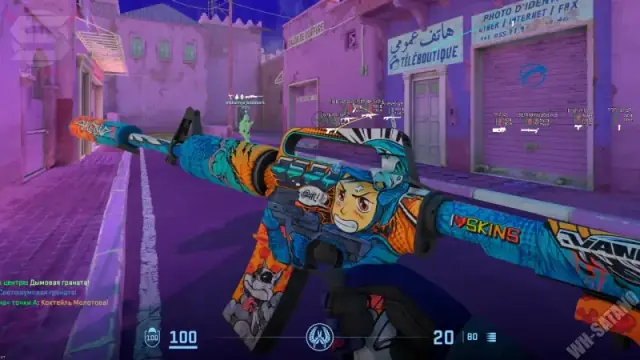
Counter Strike 2 Dust II with player ESP boxes and labels through walls

ESP

Player ESP

FOV

Smooth aimbot

Radar

In game radar

Overlay

Stream proof mode

Aimbot
FOV control
Bone selection
Player ESP
Skeleton ESP
Box styles
Health labels
Wallhack
Radar
Stream proof
Config hotkeys
Cheat menu
Status notes
Windows client
Steam build
FACEIT lobbies
VAC and FACEIT notes
Player ESP
Aimbot
Radar
Stream proof
Aimbot
FOV control
Bone selection
Player ESP
Skeleton ESP
Box styles
Health labels
Wallhack
Radar
Stream proof
Config hotkeys
Cheat menu
Status notes
Windows client
Steam build
FACEIT lobbies
VAC and FACEIT notes
Player ESP
Aimbot
Radar
Stream proof

Features

Modules on one license

Counter Strike 2 Cheats brings player ESP, aim tuning, radar and misc controls into one FACEIT build menu. Use the cards to see what each setting changes and confirm the current module list before ordering.

Player ESP

Read the marker labels.

Player overlays are designed to show boxes, skeletons, health and distance on the FACEIT build. Filters can limit teammates or enemies where the listing lists them.

  • Box and skeleton styles
  • Optional health labels
  • Distance readouts
  • Team or enemy filters

Aimbot

Choose how aim responds.

Field of view sets how far from your crosshair the software checks for targets. Smoothing affects the movement toward the bone you select.

  • Adjustable field of view
  • Aim smoothing
  • Bone selection
  • Visible check on supported builds

Radar

Follow movement on a map.

In game radar options can show nearby players with range and ring settings on supported FACEIT builds.

  • Adjustable radar range
  • Player position markers
  • Transparency and size controls
  • Proximity alerts on some builds

Stream proof overlay

Check recording behavior.

The misc menu can include a stream proof toggle designed to limit what typical capture software shows while you adjust other visuals.

  • Toggle in the misc tab
  • Works with overlay layout
  • Confirm behavior after patches
  • Test with your capture setup

Config and hotkeys

Save layouts quickly.

Config save and load options let you store presets and bind panic or menu keys where the FACEIT listing lists them.

  • Save and load presets
  • Panic key on supported builds
  • Menu toggle hotkeys
  • Cloud DMA noted where required

Movement options

Check extras by release.

Some listings describe recoil control, spread tweaks or movement assists. Confirm which weapon options your product lists.

  • No recoil on some builds
  • RCS or spread options
  • Check the current module list
  • Ask support about coverage

Cheat menu

Keep the overlay readable.

A shorter display range and distinct marker colors help when many labels crowd the screen. Adjust the overlay through its in game menu.

  • Marker colors
  • Display distance limits
  • Overlay filters
  • Adjustable keybinds

Status and updates

Recheck after updates.

CS2 patches and VAC or FACEIT anti cheat updates can change menu options. Ask support about the current FACEIT build before relying on older settings.

  • Release updates after patches
  • Check Steam build compatibility
  • Module behavior can change
  • Email support for loader errors

Windows requirements

Check your setup first.

Give support your Windows version and client build so they can tell you what the current loader requires.

  • Current game build
  • Installed Windows version
  • Current loader requirements
  • Compatibility after updates

Store

Counter Strike 2 Cheats and add ons

Start with Counter Strike 2 Cheats for the FACEIT build. The catalog also lists three utilities with separate checkout pages.

CS2 ESP and Aimbot Features

See smooth aim, player ESP, skeleton and box options, radar, stream proof mode and config hotkeys on the FACEIT build page.

Review FOV, smoothing and bone options alongside player ESP and radar screenshots from the FACEIT build menu.

  • Aimbot
  • Player ESP
  • Skeleton ESP
  • Radar

HWID Spoofer for device login blocks

After a device flag, HWID Spoofer is designed to refresh disk, network adapter and graphics card identifiers. Run the included cleanup pass afterward.

Hardware ID edits with a cleanup pass

  • Disk volume serials
  • Adapter MAC edits
  • Graphics ID changes
  • Included cleanup pass

Cloud DMA on one gaming PC

Set up the virtual environment on your gaming PC with the Cloud DMA installer. The full setup requires three additional purchases.

One PC delivery layer for catalog tools

  • Hyper V on one gaming PC
  • Installer guidance
  • Encrypted service activation
  • Virtual environment provisioning

Preview cosmetics with Skin Changer

Cosmetic presets are designed to appear on your screen for the session. The previews clear when you close the client.

Preview supported cosmetics on your display

  • Weapon finish previews
  • Character outfits
  • Knife silhouette presets
  • Roster of major games

Why us

Check modules and patch support

If you searched for Best CS2 Cheats, compare the FACEIT module list, Cloud DMA notes and patch support before choosing.

  • Updates after patches

    After a game patch or anti cheat update, ask support which menu options still work with your build.

  • Aimbot and ESP controls

    See how aim assist picks a target and how far overlays draw labels. These settings serve different jobs in a CS2 round.

  • Support channels

    When an order or loader fails, send support the order email, your Windows build and the error that appeared.

  • Menu and listed extras

    The menu groups overlay appearance and input controls. Capture behavior and a panic key are unconfirmed for the current release.

  • Saved configs

    If a release supports saving presets, keep a copy of the layout you use most.

  • Device flags use their own license

    Use the HWID Spoofer listing for device identifier changes. Its checkout is separate from the main Counter Strike 2 Cheats software.

Varies

Patch turnaround

Update timing depends on which modules the patch affects.

Setup

Setup guidance

Send setup questions through the support channels listed on this site.

Version

Feature availability

Confirm the available options for your selected version.

Setup guide

From checkout to your first match in just three simple steps

Find the portal instructions in your order. Use the setup guide to check one module at a time before a live FACEIT queue.

  1. Open portal and download loader

  2. Launch and configure modules

  3. Verify status and launch CS2

How it works

From preparation to saved profile.

Use your order to get the loader, then check how each control behaves on your build.

4 setup steps

  1. 01

    Check requirements

    Send support your client build and Windows version before you choose a term.

  2. 02

    Choose your product

    Choose Counter Strike 2 Cheats for FACEIT lobby overlays and aim controls. The other listings cover device identifiers, virtual delivery or local previews.

  3. 03

    Launch and configure

    Open the loader from the portal and try a single module first. Check what its labels show before you add more.

  4. 04

    Save your profile

    If your build lets you store presets, save a layout after checking marker range and keybinds.

Blog

Guides and updates

ESP and aimbot setup, menu tuning and patch day checks for Counter Strike 2 FACEIT builds.

FAQ

Questions about this page

Answers tied to what you are reading. Visit the FAQ page for every topic.